Wednesday, May 25, 2011

An Interesting Variable Behavior

I have promised you that I will illustrate an interesting example in my next post. Here we go with that interesting variable behavior.

If you type an integer with a leading zero, you might get a confusing error.


Other numbers seem to work, but the results are bizarre.


Can you figure out what is going on? It’s really confusing. Isn’t it?

When we assign an integer with a leading zero, Python assumes that it’s an octal number, and stores its corresponding decimal value. Take a look at the figure below.


We know decimal values of (010)8 = 8, (0100)8 = 64 etc. Here (02132)8 has the decimal value 1114. Then what is the error in 02492? It’s not an octal number at all. We know octal number have only digits 0 to 7.  02492 have 9 in it. So an error occurred.

Just for my curiosity, I tried an integer with two leading zeros and I got the same effect. I tried another one with floating values with leading zeros in their integer part. I found it is same as the normal floating values and no octal-decimal conversion take place.


Have you enjoyed? Keep browsing TaLenCia, I will be back with more interesting facts about Python.

Thanks

AJAY

Tuesday, May 24, 2011

Variables

Here I’m posting explanations and examples related to the variables used in Python. We all are familiar with variables in C programming language. Python variables are almost similar to that.

The variables are used to store values. Example for values are 1, “Hello World”, 23.67 etc. The basic types for variables are integer, string and floating point.

The print statement also works for integers. If you are not sure what type a value has, the interpreter can tell you. This two are illustrated below.


It explains the 3 basic variable types. You may have noticed in the above picture that the type of values ‘17’ and ‘2.9’ are string. It’s because they are in quotation marks like strings.

Have a look at the below picture.


It’s a surprising output. Isn’t it? It’s nothing but Python interprets 1,000,000 as a comma-separated sequence of integers, which it prints with spaces between.

Now take a look at how we can declare variables by just assigning the values.


The first assigns a string to a new variable named message; the second gives the integer 17 to n; the third assigns the approximate value of π to pi. We can also print the values or type of the variables using the print statement.

Programmers generally choose names for their variables that are meaningful. Variable names can be arbitrarily long. They can contain both letters and numbers, but they have to begin with a letter. The underscore character can appear in a name.


In the above picture, 76trombones is illegal because it does not begin with a letter. more@ is illegal because it contains an illegal character, @. Can you guess why class is an invalid variable name? It’s nothing but class is a keyword. Keywords are the tokens that have specified meaning in that programming language and it cannot be used as a user defined variable name. Python have 31 keywords.

and,del,from,not,while,as,elif,global,or,with,assert,else,if,pass,yield,break,except,import,print,class,exec,in,raise,continue,finally,is,return,def,for,lambda,try.

An interesting example of variable nature in Python will be illustrated to you in the next post.

Thanks

AJAY

Monday, May 23, 2011

Hello World!!!!

I want to start this post with a funny thought. I don’t know why all teachers use “Hello World!” example as the beginning to any programming languages. Even the author of “Think Python” Allen B. Downey uses the same. Can they just change the words? I think this program has been accepted world wide as the first program of any language.

“Hello World!” In Python looks like this:
print 'Hello World!'

The output will be
Hello world

In Python 3.0, print is a function, not a statement, so the syntax is 
print(’Hello, World!’)

We will discuss about functions soon. Now it’s time for discuss an example given in “Think Python” implementing the use of print statement and mathematical operations. The example is

If you run a 10 kilometer race in 43 minutes 30 seconds, what is your average time per mile? What is your average speed in miles per hour? (Hint: there are 1.61 kilometers in a mile).

It’s a simple program and logic is also simple. Isn’t it?

Logic is, we have to first find distance he ran in one minute in terms of mile (i.e., miles/minute) and then we have to multiply it with 60 (for converting into miles/hr).

I have done this program in python and its screenshot is given below.


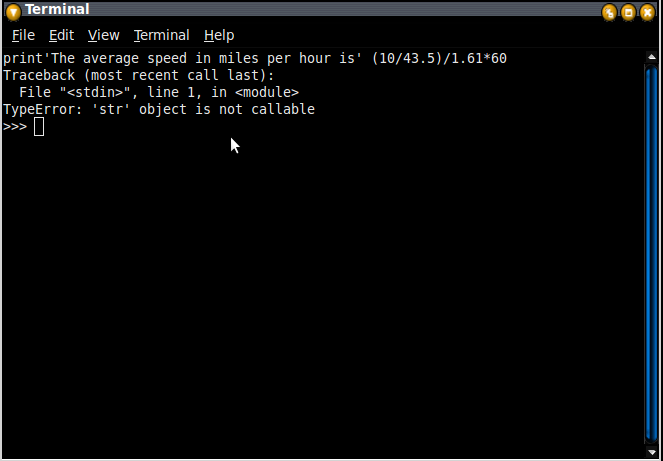
Notice that I have to use a comma after the print'The average speed in miles per hour is' statement; otherwise you will get an error like this.


That’s it! My first program is over. Now I want to study more about variables, expressions and statements and will be back soon.

Thanks

AJAY