Showing posts with label Python Exercises. Show all posts

Friday, July 15, 2011

Exercises on Tree

We all know the tree structure in data structures. We got some problems that can be solved using the python.

We have a list that contains values in tree manner. A list with only root value 10 is like,

[[],10,[]]

Here the left and right nodes are empty. When we add an element, say 5, in the right node then it will be like,

[[],10,[[],5,[]]

If we add 11 to left node,

[[[],11,[]],10,[[],5,[]]]

I think you got the idea. A list will always have a value in the middle and two inner lists to represent right and left nodes.

Our problems are,

  1. Just print the elements of the tree in any order.
  2. Find the total number of nodes.
  3. Find the height of the tree.

We use the recursion in these problems. Answers are given below.

Problem 1:

def treeprint(list1):
    for lista in list1:
        if isinstance(lista, list):
            liatb = treeprint(lista)
        else:
            print lista

Problem 2:

def treenode(list1):
    node = 0
    for lista in list1:
        if isinstance(lista, list):
            if len(lista) > 0 :
                listb = treenode(lista)
            else :
                listb = 0
        else:
            listb = 1
        node = node + listb
    return node

Problem 3:

def treeheight(list1):
    if len(list1) == 0:
        return 0
    left = 1 + treeheight(list1[0])
    right = 1 + treeheight(list1[2])
    if left > right:
        return left
    else:
        return right

Possible test values are,

[[],10,[]]
[[[],5,[]],10,[]]
[[[],5,[]],10,[[],6,[]]]

You can also download all the answer codes as a zip file. Click here.

Thanks

AJAY

Accessing a file with SQLite3 using python

Before experimenting with this problem, we need to install SQLite first. Type the following command in terminal.

sudo apt-get install sqlite3

After installing it, we can test it by typing import sqlite3 in python interactive window. 

Now come to our problem. We need to create a text file in which name, age and mark of a list of students are already saved. Our requirement is to write a python program which stores the name, age and mark from the text file to a table in the SQLite3 database.

We need to import sqlite3 module to work this program correctly. A database is created first, say ajay.db.

conn = sqlite3.connect('ajay.db')

Then create  a table t1 in that database.

curs.execute('''create table t1(name varchar2(25), age integer, mark integer)''')

curs is the object that connects with the database ajay.db. it can create by following code,

curs = conn.cursor()

Then open the text file and split it and save each name, age and mark as lists and save it to a dictionary like {[name1,age1,mark1],[name2,age2,mark2] ...... }.

After that we need to enter them to the table t1.

curs.execute('''insert into t1 values(?,?,?)''',dic[item])

This is the code used for that. Then commit that transaction. Then finish it by writing the main function. When we run this code we need to write the command as,

python test.py a.text

The a.text is the argument we are passing and that text file contains the list of details that is required to save in the table t1. You can download the source code of this problem which includes test.py and a.text by clicking hereExperiment on it.

Thanks

AJAY

Saturday, June 25, 2011

More Sample Programs

If you have read my previous post, then you can continue with this post. Otherwise please read that post (click here)  to get some awareness about assert function.


Sample 1 : Two sorted lists are given. We need to merge them and keep the merged list also in ascending order. Don't use sort/sorted functions.


def merge(a, b):
    list1=a
    list2=b
    list3=[]

    while len(list1) and len(list2):
        if list1[0] < list2[0]:
            list3.append(list1.pop(0))
        else:

            list3.append(list2.pop(0))
            list3.extend(list1)
    list3.extend(list2)
    return list3

def main():
    assert(merge([1], [2]) == [1,2])
    assert(merge([10, 20], [30]) == [10, 20, 30])
    assert(merge([10, 30, 40], [32, 33, 45, 57]) == [10,30,32,33,40,45,57])
    assert(merge([20, 25, 27, 34], [1, 10, 23]) == [1,10,20,23,25,27,34])
    assert(merge([1], []) == [1])
    assert(merge([], [1, 2]) == [1,2])
if __name__=='__main__':
    main()


Sample 2 : Insert an integer number to the sorted list and keep the list in sorted order even after the insertion. Don't use sort/sorted functions.

def insert_into(a, n):
    list1=a
    if len(list1)==0:
        list1=[n]
        return list1
    i=0
    while i<len(list1):
       if list1[i]>n:
           list1.insert(i,n)
           return list1
       elif i==(len(list1)-1):
           list1.append(n)
           return list1
       else:
           i=i+1

def main():
    assert(insert_into([10, 20, 30], 24) == [10,20,24,30])
    assert(insert_into([5, 10, 20], 3) == [3,5,10,20])
    assert(insert_into([1, 10, 20], 30) == [1,10,20,30])
    assert(insert_into([], 10) == [10])
    assert(insert_into([1, 4, 18, 24, 27, 35, 87], 19) == [1,4,18,19,24,27,35,87])
if __name__=='__main__':
    main()

Sample 3 : This program is used to flatten the lists. i.e a list like this [1, [2, [3, [4]]]] will be flatten to a list [1,2,3,4].

def flatten(a):
    main_list=a
    lista=[]
    for small_list in main_list:
        if isinstance(small_list,list):
            listb=flatten(small_list)
            lista.extend(listb)
        else:
            lista.append(small_list)
    return lista

def main():
    assert(flatten([[1,[2,3]]]) == [1,2,3])
    assert(flatten([[[1,2]]]) == [1, 2])
    assert(flatten([[[]]]) == [])
    assert(flatten([1, [2, [3, [4]]]]) == [1,2,3,4])
if __name__=='__main__':
    main()

Sample 4 : We have to partition a given list into two lists based on the first element of the list. We will have two partitioned lists as output, one holds all elements that are lesser than the first element of the input list and the second list holds all elements that are greater than the first element of the input list.

 def partition(a):
    list1=a
    list2=[]
    list3=[]
    list4=[]
    for item in list1:
        if item<list1[0]:
            list2.append(item)
        elif item>list1[0]:
            list3.append(item)
    list4=[list2]
    list4.extend([list3])
    return list4

def main():
    assert(partition([10,8,2,11,14,6,1,13]) == [[8,2,6,1],[11,14,13]])
    assert(partition([1,2,3,4]) == [[],[2,3,4]])
    assert(partition([1]) == [[],[]])
    assert(partition([4,3,2,1]) == [[3,2,1],[]])
if __name__ == '__main__':
    main()


Sample 5 : Here we have to define two functions. add() adds a key "k" with value "v" to dictionary "d". get() return value corresponding to key "k" or return None if key k is not present. Main objective is to simulate a dictionary using  a list.

def add(d, k, v):
    if len(d)==0:
        list1=[k,v]
        d.append(list1)
        return d
    for lists in d:
        if lists[0]==k:
            lists[1]=v
            return d
    list1=[k,v]
    d.append(list1)
    return d

def get(d, k):
    for lists in d:
        if lists[0]==k:
            v=lists[1]
            return v
    return None

def main():
    assert(add([], "hello", 10) == [["hello", 10]])
    assert(add([["hello", 10]], "world", 20) == [["hello", 10], ["world", 20]])
    assert(add([["hello",10],["world",20]], "hello", 30) == [["hello",30],["world",20]])
    assert(get([["hello",10],["world",20]], "world") == 20)
    assert(get([["abc",1],["def",2]], "ijk") == None)
if __name__=='__main__':
    main()

I hope you will learn the basic concepts through these sample programs. You can also download these programs as a zip file. Download here.

Thanks

AJAY

Sample Python Programs

In this post I wish to add some basic and simple programs in Python which are experimented by me. This will be helpful to beginners of Python language. This examples are for script mode execution.

Before directly go to the program, I want to explain about assert function. Its a function generally used to check the correctness of another function. Programmers generally use this function to check the return value of a function. It checks the expression, and if the expression is true it doesn't perform any action. Otherwise if the expression is false, we get assertion error.

In my sample programs, I used the assertion function. If you run this program it will not display anything,because the code returns expected values. If you want to experiment on it insert print() in the functions and you can understand what is happening inside the programs. After modification,if you get an assertion error it means the code returns wrong values.

Sample 1 :  This program checks whether a given number is a factorial of any number.


def is_factorial(n):
    i=1
    f=1
    while i<=n:
        f=f*i
        if f==n:
            return 1
        if f>n:
            break
        i=i+1 
    return 0
  
def main():
    assert(is_factorial(6))
    assert(not is_factorial(100))
    assert(is_factorial(1307674368000L))
    assert(is_factorial(120))
if __name__=='__main__':
    main()

Sample 2 : This program checks whether the given tuple is in ascending order. Don't use sort/sorted functions.

def is_sorted(a):
   x=a
   i=1
   while i<len(x):
       if x[i-1]>x[i]:
           return 0
       i=i+1
   return 1 

def main():
    assert(is_sorted((10, 20, 30, 32, 33)))
    assert(is_sorted((1,)))
    assert(is_sorted((1,2)))
    assert(not is_sorted((2, 1)))
    assert(not is_sorted((1, 4, 7, 8, 6)))
    assert(not is_sorted((10, 20, 30, 25, 34, 45, 67)))
if __name__=='__main__':
    main()

Note that these are not professional codes and you can find out more simple and efficient codes for these problems. Five more samples will be published in my next post.

Thanks

AJAY

Sunday, June 19, 2011

Exercises on Statements and Expressions

The Think Python author has given 2 more sample problems in order to understand the various statement and expression behaviours.

Assume that we execute the following assignment statements:
width = 17
height = 12.0
delimiter = '.'
For each of the following expressions, write the value of the expression and the type (of the value of the expression).
  1. width/2
  2. width/2.0
  3. height/3
  4. 1 + 2 * 5
  5. delimiter * 5
Use the Python interpreter to check your answers.

I’m trying to guess the answers first.
           1.      8
           2.     8.5
           3.     4.0
           4.     11
           5.     …..

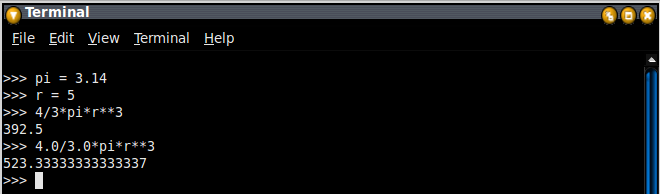
Now I’m trying the same using interactive mode and the snapshot is given below.


Next problem is
Practice using the Python interpreter as a calculator:
The volume of a sphere with radius r is 4/3 π r3. What is the volume of a sphere with radius 5? Hint: 392.6 is wrong!


We should carefully use the integers and floating point values in division.

Thanks

AJAY

Interactive vs Script


Here I want to discuss about the differences in interactive mode and script mode. Some changes in code must be done in order to execute the same program in both modes.

If you type an expression in interactive mode, the interpreter evaluates it and displays the result:

>>> 1 + 1
2

But in a script, an expression all by itself doesn’t do anything!

We can solve our confusion by an example.

The author of Think Python has given a problem for solving this.

Type the following statements in the Python interpreter to see what they do:
5
x = 5
x + 1
Now put the same statements into a script and run it. What is the output? Modify the script by transforming each expression into a print statement and then run it again.

When I run the code in interactive mode I got the output as usual.


When I run the same in script code I got no output. So I tried the same program with print statements and I got the results.


In script mode we must use the print statement in order to display some outputs whereas in interactive mode print statement is not necessary.

Thanks

AJAY

Wednesday, May 25, 2011

An Interesting Variable Behavior

I have promised you that I will illustrate an interesting example in my next post. Here we go with that interesting variable behavior.

If you type an integer with a leading zero, you might get a confusing error.


Other numbers seem to work, but the results are bizarre.


Can you figure out what is going on? It’s really confusing. Isn’t it?

When we assign an integer with a leading zero, Python assumes that it’s an octal number, and stores its corresponding decimal value. Take a look at the figure below.


We know decimal values of (010)8 = 8, (0100)8 = 64 etc. Here (02132)8 has the decimal value 1114. Then what is the error in 02492? It’s not an octal number at all. We know octal number have only digits 0 to 7.  02492 have 9 in it. So an error occurred.

Just for my curiosity, I tried an integer with two leading zeros and I got the same effect. I tried another one with floating values with leading zeros in their integer part. I found it is same as the normal floating values and no octal-decimal conversion take place.


Have you enjoyed? Keep browsing TaLenCia, I will be back with more interesting facts about Python.

Thanks

AJAY

Monday, May 23, 2011

Hello World!!!!

I want to start this post with a funny thought. I don’t know why all teachers use “Hello World!” example as the beginning to any programming languages. Even the author of “Think Python” Allen B. Downey uses the same. Can they just change the words? I think this program has been accepted world wide as the first program of any language.

“Hello World!” In Python looks like this:
print 'Hello World!'

The output will be
Hello world

In Python 3.0, print is a function, not a statement, so the syntax is 
print(’Hello, World!’)

We will discuss about functions soon. Now it’s time for discuss an example given in “Think Python” implementing the use of print statement and mathematical operations. The example is

If you run a 10 kilometer race in 43 minutes 30 seconds, what is your average time per mile? What is your average speed in miles per hour? (Hint: there are 1.61 kilometers in a mile).

It’s a simple program and logic is also simple. Isn’t it?

Logic is, we have to first find distance he ran in one minute in terms of mile (i.e., miles/minute) and then we have to multiply it with 60 (for converting into miles/hr).

I have done this program in python and its screenshot is given below.


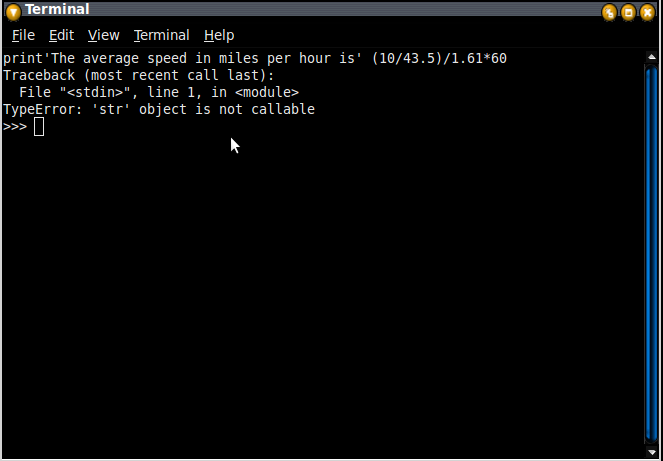
Notice that I have to use a comma after the print'The average speed in miles per hour is' statement; otherwise you will get an error like this.


That’s it! My first program is over. Now I want to study more about variables, expressions and statements and will be back soon.

Thanks

AJAY