Showing posts with label Git. Show all posts

Friday, August 3, 2012

Git Tutorial

Git is a distributed revision control and source code management system with an emphasis on speed. Git was initially designed and developed by Linus Torvalds for Linux kernel development. Every Git working directory is a full-fledged repository with complete history and full revision tracking capabilities, not dependent on network access or a central server. Git is free software distributed under the terms of the GNU General Public License version 2.

Here i am giving you the excellent tutorial for mastering Git.


Thanks

AJAY

Sunday, July 29, 2012

Git Based Wiki Implementation

A wiki implementation based on the Git, a Distributed Version Control System, is the academic project done by me during my MCA. It is a completely open source tools oriented wiki engine that has many powerful capabilities. 

We know, a wiki is a collection of various articles contributed by various writers around the world. There may be chances of updating an article with unwanted or abusing data. So we may need to revert the modified article to its previous state. We generally use a version control management system for that purpose. I used Git in my project for that purpose.

As Git is a powerful DVCS (Distributed Version Control System), the wiki engine is more efficient to keep track of the versions. Git is a open source tool that is  developed by the Linux developer team. Its more efficient with its powerful commands.


I am using SQLite3 as the database. Webpy is the framework used here. HTML and CSS is used for the user interface. Python is the language used to write the wiki engine. Markdown style is used for writing the articles. The project is completely developed under Linux platform.

Here is some screen shots of my project.


You can read following articles regarding my project.


Thanks

AJAY 

Tuesday, October 4, 2011

Git in Python using Subprocess


I already introduced you the DVCS used in my project, Git. Git is a powerful open source tool which is used for the version control system. It is developed by the Linus Torvards who has already gifted us the powerful kernel of Linux. In this post, I want to describe you how I integrated git with python.

We need to import subprocess module for this. We are calling the git commands using the subprocess.

import subprocess
from subprocess import call

Subprocess allows us to call the command that run in terminal. We know the command for displaying files in the current directory is “ls”. For calling “ls” from the python program using the subprocess module,

subprocess.Popen(["ls"],cwd = accpath)

cwd is the current working directory. We need to specify the path of the current directory like /home/ajay/Documents. It can be assigned to a variable like accpath.

dirpath = os.path.dirname(os.path.realpath('articles'))
accpath = dirpath + '/articles'

In my project I need to initialize the git repository first. So I need to write the following code,

subprocess.Popen(["git","init"],cwd = accpath)

Now I need to write the proper codes for calling the git commands, whenever an article is created/modified. When an article is created, the following codes are used to add the modified files and to commit them.

subprocess.Popen(["git","add",title.lower()],cwd = accpath)
subprocess.Popen(["git","commit","-m","'committed'"],cwd = accpath)

title.lower() is used save the article name in small letters.

Now we need to save the details of hash codes of particular commits, because we need that hash code in order to perform rollbacks in future. So we need to extract the hash code from each commit. Git log command helps to see the commits and its hash codes. "git log -p -1” command displays the last commit and its hash code. We need to save that message in a file. Use the following code for that.

p = subprocess.Popen(["git","log","-p","-1"], cwd = accpath, stdout = subprocess.PIPE,)
stdout_value = p.communicate()[0]
t1 = repr(stdout_value)

Now “t1” has the message which is displayed by entering "git log -p -1”. We need to extract the hash code from it using the regular expressions. I will write post about regular expression soon.

The same commands can be used whenever an article is modified. I will post more issues I faced during the project development.

Thanks

AJAY

Friday, July 29, 2011

Git - Basic Commands


You can create an github account inorder to avail a free online git repository service. It’s not as normal site registration. It contains many steps including the set up of passphrase and keys.

You can also set up a git repository in your system also. For that you need to install the git packages first. For installing git package in your ubuntu or other Debian based system, type the following command,

$ sudo apt-get install git-core

We need to set our username and email id.

$ git config --global user.name "Ajay Soman"
$ git config --global user.email ajaysoman@example.com

Then you can create a git repository in the current directory.

$  git init

If want to add a corresponding file in the current directory,

$  git add filename

If you want to add all files then,

$ git add .

We cannot see the git repository in our current directory. It is hidden. Use ctrl+H to see the hidden files. Now commit all updates,

$ git commit -m 'first commit'

You can see the status of the repository to track the unstaged and updated files by the command,

$ git status

To see what you’ve changed but not yet staged, type git diff with no other arguments,

$ git diff

If you want to see what you’ve staged that will go into your next commit, you can use,

$ git diff –cached

To view the log of all the actions that are performed on the repository, use the following command,

$ git log

You can also clone a file from the github repository to own local machine. We need the exact URL of the online repository for that.

$ git clone url

These are the some basic commands that are used in Git to manage the files in it.

Thanks

AJAY

Friday, July 22, 2011

Three states of a file in Git


In my previous post I explained you the main advantages of Git. Here we need to concentrate on the main states that a file will face in Git.

Git has three main states that your files can reside in: committed, modified and staged. Committed means that the data is safely stored in your local database. Modified means that you have changed the file but have not committed it to your database yet. Staged means that you have marked a modified file in its current version to go into your next commit snapshot. This leads us to the three main sections of a Git: the Git directory, the working directory, and the staging area.


The Git directory is where Git stores the metadata and object database for your project. This is the most important part of Git, and it is what is copied when you clone a repository from another computer.

The working directory is a single checkout of one version of the project. These files are pulled out of the compressed database in the Git directory and placed on disk for you to use or modify.

The staging area is a simple file, generally contained in your Git directory, which stores information about what will go into your next commit. It’s sometimes referred to as the index, but it’s becoming standard to refer to it as the staging area.

Thanks

AJAY

Thursday, July 21, 2011

Git - Characteristics


I have introduced you the powerful DVCS, Git in my previous post. In this post, I give emphasis on the characteristics and advantages of Git.

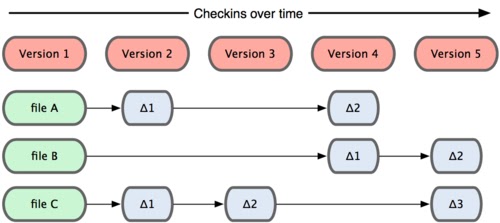
Other version control systems like Bazaar, Subversion and CVS treats their data as a set of files and the changes made to each file over time.


Git doesn’t think of or store its data this way. Instead, Git thinks of its data more like a set of snapshots of a mini file system. Every time you commit, or save the state of your project in Git, it basically takes a picture of what all your files look like at that moment and stores a reference to that snapshot.


Most operations in Git only need local files and resources to operate — generally no information is needed from another computer on your network. To browse the history of the project, Git doesn’t need to go out to the server to get the history and display it for you — it simply reads it directly from your local database. If you want to see the changes introduced between the current version of a file and the file a month ago, Git can look up the file a month ago and do a local difference calculation, instead of having to either ask a remote server to do it or pull an older version of the file from the remote server to do it locally.

Everything in Git is check-summed before it is stored and is then referred to by that checksum. This means it’s impossible to change the contents of any file or directory without Git knowing about it. The mechanism that Git uses for this check summing is called a SHA-1 hash. A SHA-1 hash looks something like this:

24b9da6552252987aa493b52f8696cd6d3b00373

When you do actions in Git, nearly all of them only add data to the Git database. It is very difficult to get the system to do anything that is not undoable or to make it erase data in any way. After you commit a snapshot into Git, it is very difficult to lose.

Another important thing that should be kept in mind is the three states of files in Git. I will come through that in my next post.

Thanks

AJAY

Wednesday, July 20, 2011

Git - An introduction

Before going to Git, I want you to familiar with the versions or revisions. What is a version? In our concern, versions have definition like : a version is any change in form.

Suppose we are working in a project for developing a computer game. Suppose the game have a size of 1GB. If we want to make a change in the code, first we take a copy of the game in order to rollback in the future. So we need another 1GB in the hard disk. Imagine if hundreds of software engineers are updating the game, how much memory will be consumed by them? Is it a efficient way?

Here comes the advantage of a version control system. The version control system keeps various versions of the updates, not the entire software. It keeps the snapshots or current stage of the software and saves them as versions. So when programmers make changes and commit the changes, a new version is saved. We can rollback to any version at any time.

Software versioning is the process of assigning either unique version names or unique version numbers to unique states of computer software. A revision control is often used for keeping track of incrementally different versions of electronic information, whether or not this information is actually computer software. A Revision is the state at a point in time of the entire tree in the repository. The repository is where files' current and historical data are stored, often on a server.

The major DVCS(Distributed Version Control Systems) are Git, Mercurial, Bazaar, Fossil, Codeville, SVK etc. These all are open source DVCS tools. TeamWare and BitKeeper are the examples of proprietary DVCS tools.

In my main project I’m using the powerful DVCS – Git – to keep track of the versions of wiki articles. Git is developed by the famous Linus Torvalds. He was the developer of Linux also. Its initial release was on April 2005 and it is written in C, Bourne Shell and Perl. Git is primarily developed on Linux, but can be used on other Unix-like operating systems including BSD, Solaris and Darwin. Git is extremely fast on POSIX-based systems such as Linux. It can be also used in Windows systems.

The following websites provide free source code hosting for Git repositories:

You can create a free account in GitHub and I will post soon about how we can create and configure a repository in the GitHub.
 
Thanks

AJAY